Free reverse phone lookup: what works and what to skip
You've had a call from a number you don't know, or you found a number and want to know whose it is, and you'd rather not pay for the answer. That's possible more often than people think. Still, most sites that promise a "free reverse phone lookup with name" aren't free: you type the number, watch a progress bar "search records", and hit a payment page right before the name appears.
We've tested free phone lookup tools for years, and this guide is the result. It reviews each free option one by one, with what it finds, what it costs you in privacy and where it fails. It explains why a free cell phone lookup with a name is so rare, how the teaser sites trick you into paying, and when a paid report is worth it. It works for US numbers and, with fewer tools, for numbers in other countries. Our reverse phone lookup guide puts every method in order, from free to paid.
In this guide
- Why a free cell phone lookup with name is so rare
- How the "free" sites really work
- Free reverse phone lookup tools, tested
- Truecaller: free, but you pay with your data
- Tools that no longer work
- Be careful with caller ID apps
- Landlines and business numbers
- Free or paid: when a report is worth it
- Find lost contacts through old numbers
- The order we'd use
- Your own data is part of the price
- Questions about free phone lookups
Why a free cell phone lookup with name is so rare
For decades, landline numbers were printed in phone books with the owner's name and street address. The Library of Congress even keeps a collection of old telephone books. Many of those listings moved online into white pages sites, which is why a landline is often easy to identify for free.
Mobile numbers never worked that way. Carriers sell numbers to individuals, businesses and organizations without publishing who owns them, and they keep the account holder's name private. They share it only with the account holder or with police who have a legal order. There has never been a public phone book for cell numbers.
So any site that shows the owner of a mobile number got the name from somewhere else: data breaches, marketing lists, public records that mention the number, or the contact books of other app users. That data costs money to collect, clean and store, and that's why the full name sits behind a payment almost everywhere. When a result is truly free, someone else paid for it, usually with their own contacts or data.
There's also an accuracy problem with free data. Numbers get reassigned. When someone cancels a line, the carrier gives the number to a new customer after a while, and free databases often still show the previous owner. A free result can name the person who had the number five years ago.
How the "free" sites really work
Most "free reverse phone lookup" results in Google lead to the same four-step pattern. Once you recognize it, you can leave before you waste time or hand over your card number.
- Free search boxYou type the number. Nothing is charged yet.
- Fake progressAnimated "scanning court records" bars build suspense for a minute or two.
- Teaser resultYou see the carrier, the city or blurred initials, and a message that a report is ready.
- PaywallThe name needs a trial that turns into a monthly subscription.
The progress bar is theater. The report already exists in the site's database, and the wait is there to make you more likely to pay. That doesn't make every paid site a scam, since some return real data. But read the price before you enter a card, because the cheap trial often renews at a much higher monthly rate.
Some sites go further and call themselves "background check services" when they're really lead-collection forms. They ask for your name and email "to send the report", then send marketing emails for months. If a site wants your details before it shows anything, close it.
Free reverse phone lookup tools, tested
These are the free options we've used and checked again recently. None of them finds every number, so the trick is to run several. Each review says what you get, what it doesn't cover and where the catch is.
1. Google and Bing
A search engine is the best free phone lookup there is, because it searches every page where the owner ever posted the number: business sites, classified ads, forum posts, résumés and complaint sites. Search the number inside quotation marks so you get exact matches only, and try several formats, because websites write numbers differently: "555-201-3344", "(555) 201-3344" and "5552013344". For international numbers, add one with the country code, such as "+44 7700 900123".
If you already have a name or a city, add it after the number to check whether they appear together. Then repeat everything in Bing, because it indexes different pages than Google. Yahoo's results come largely from Bing, so it rarely adds anything new.
Google used to run a free phone book lookup of its own years ago. It removed it after many people asked for their numbers to be taken out, and it never came back. So today, a Google search finds a number only where someone published it.
Best for: business numbers, sellers, scam callers that other people have reported. Weak on: private mobile numbers that were never posted online.
2. WhatsApp, Telegram and Viber
Save the number in your contacts under any name, then open WhatsApp, Telegram and Viber. Many people leave their profile photo and name visible to anyone who has their number, and the owner isn't told that you saved it. This works for numbers from almost every country, which makes it the best free option outside the US.
Best for: putting a face to a mobile number. Weak on: people who hide their profile photo from non-contacts.
3. Spy Dialer
Spy Dialer is one of the few US lookup sites that's still free without an account. Type a number and it shows a name linked to it, where it has one, along with the line type and a rough location. It works for US mobile numbers, landlines and VoIP numbers. Its data comes from public records and other databases, so it can be old, and it often has nothing for prepaid or recently changed numbers.
Best for: a quick free name check on US numbers. Weak on: anything outside the US, and very new numbers.
4. Whitepages and Yellow Pages
Most people start with white pages, and for landlines and business numbers that's a good instinct. Whitepages shows the name and city for many listed landlines and businesses for free. Try a well-known company's number and you'll get the full listing without paying. Yellow Pages does the same for businesses.
For mobile numbers, though, Whitepages usually shows only the carrier and a general location, and asks you to pay for the name and full report. Unlisted numbers don't show up at all. So treat it as a landline and business tool, not a free cell lookup.
Best for: listed landlines and businesses. Weak on: mobile and unlisted numbers.
5. Free people search sites
A few US sites, such as TruePeopleSearch and FastPeopleSearch, show names, ages, past addresses and possible relatives for free and make their money from ads. For US numbers, they're the closest thing to a free cell phone lookup with a name.
The catch is quality. The records are often years old, they mix up people with the same name, and they cover almost nobody outside the US. Paid sites often show a short free preview too, such as an age range, a city and relatives' first names. If the preview says "Sarah, 30s, Tucson" and you know a Sarah in Tucson, you may not need the full report at all.
Best for: US numbers when the free methods above found nothing. Weak on: accuracy, so always confirm with a second source.
6. Carrier lookup
Free carrier lookup sites tell you which network a number belongs to and whether it's a mobile, a landline or a VoIP line. That won't give you a name, but it tells you a lot. A VoIP number from an app like Google Voice or TextNow takes minutes to create with just an email, so a "bank" or "delivery company" calling from one is a red flag.
Best for: checking whether a caller is who they claim to be. Weak on: names, which it never shows.
7. Craigslist and complaint sites
Craigslist is one of the biggest classified sites in the US, and sellers post their numbers in ads every day. Search the number on Craigslist itself and in Google with site:craigslist.org. Its forum discussions, like complaint sites where people report spam callers, can also tell you whether others had trouble with the same number.
Best for: sellers and scam numbers. Weak on: private numbers.
8. Social media
Facebook stopped letting people search for profiles by phone number in 2018, so typing a number into its search bar no longer works. Social apps still help in other ways. Instagram, Snapchat and TikTok can suggest the account linked to a number once it's saved in your contacts, if the owner allows it. LinkedIn and Facebook business pages often list a work number, which a Google search will find.
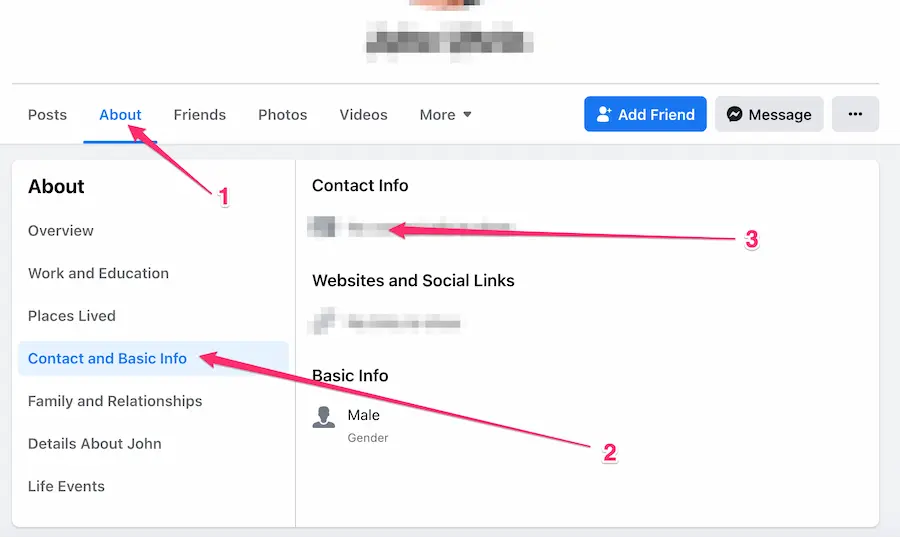
Best for: numbers that belong to active social media users. Weak on: people who switched off contact discovery.
Truecaller: free, but you pay with your data
Truecaller is the best-known caller ID app in the world, and its basic lookup is free. Millions of people install it to see who's calling before they answer. The catch is how it gets its names: from the contact lists its users upload. When you look up a number, you often see the name someone else saved it under, which can be "Mike Plumber" or "Don't answer" as easily as a real full name.
When we tried the web version, it wouldn't search anything before we signed in with a Google or Microsoft account. It also asked which state we live in and offered an "Enhanced search" option that shares more of our data. That's a lot to hand over just to see the first name of a caller.
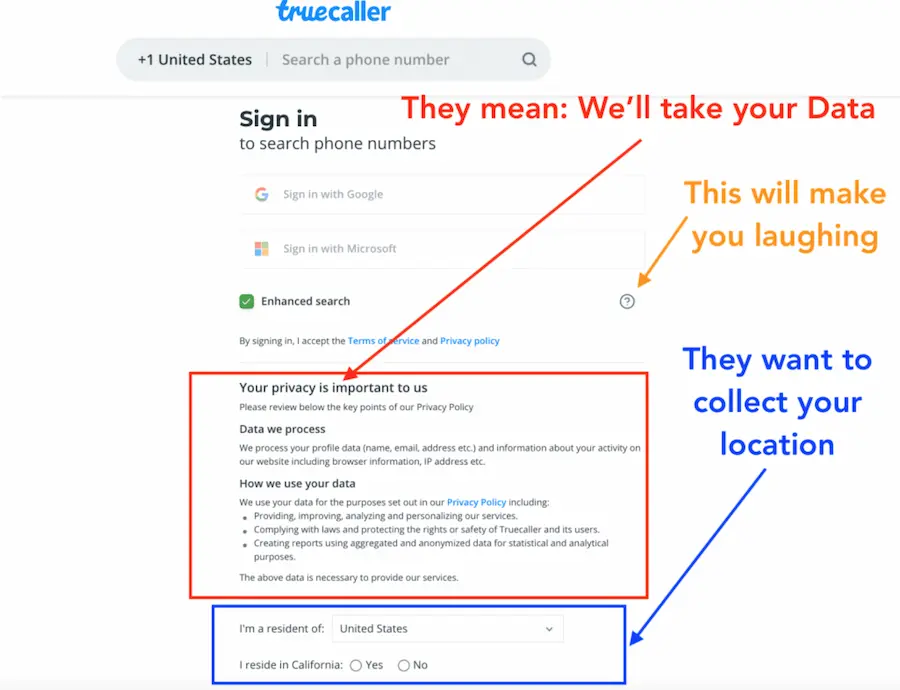
The data notice explains why. It processes your profile data, such as your name and email, and information about your activity, and it uses them to provide and improve its services. On a phone, the app also asks for access to your contacts. So every friend's number on your phone can end up in Truecaller's database, labeled with whatever name you saved.
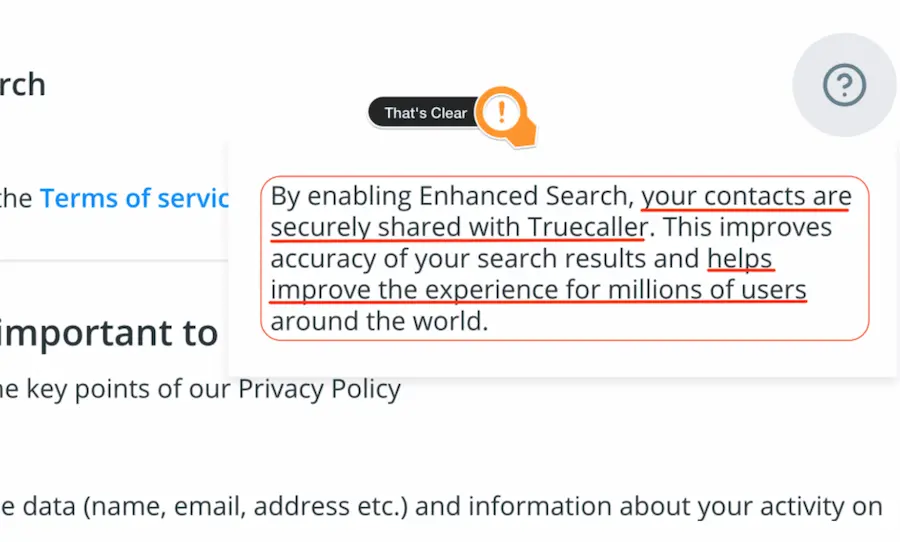
Truecaller isn't a scam, and its results are often useful. But it's free because its users supply the data. If you don't want your contacts in someone else's database, use the web version with an account you don't mind linking, or skip it and use the other free methods.
Tools that no longer work
Older guides, including the first version of this one, still recommend tools that have changed. Here's where they stand now, so you don't waste time on them.
| Tool | What changed | What to use instead |
|---|---|---|
| Pipl | Once a free people search engine, now sold only to businesses on annual contracts. | Free people search sites for US numbers, search engines elsewhere. |
| Facebook phone search | Switched off in 2018, together with the old Graph Search. | Contact sync in Instagram, Snapchat and TikTok. |
| Google phone book | Removed years ago after privacy complaints. | A quoted Google search in several formats. |
| Generic "phone lookup" sites | Many now end in a paywall or a lead form. | Spy Dialer, Whitepages for landlines. |
Be careful with caller ID apps
App stores are full of caller ID and "number tracker" apps. Some are legitimate, such as the CIA caller ID app, which identifies callers and blocks spam numbers and shows ads unless you pay to remove them. Many others promise to show who owns any number, or even where the phone is right now, and then show nothing useful except a subscription screen.
Before you install one, check what it asks for. Access to your contacts, call log and messages lets an app copy your whole address book to its servers, and some of these apps do exactly that. Android gives apps more room to collect data in the background than iOS does, so be extra careful there. And no app can show a phone's live location: only the carrier and apps the owner installed can do that.
Landlines and business numbers
Landlines are the one case where a free lookup with a name often works. Home listings from old phone books still appear in white pages sites, unless the owner paid to stay unlisted. Business numbers are even easier: a quoted Google search finds the company's website, its Google Business profile or its listing on review sites almost every time.
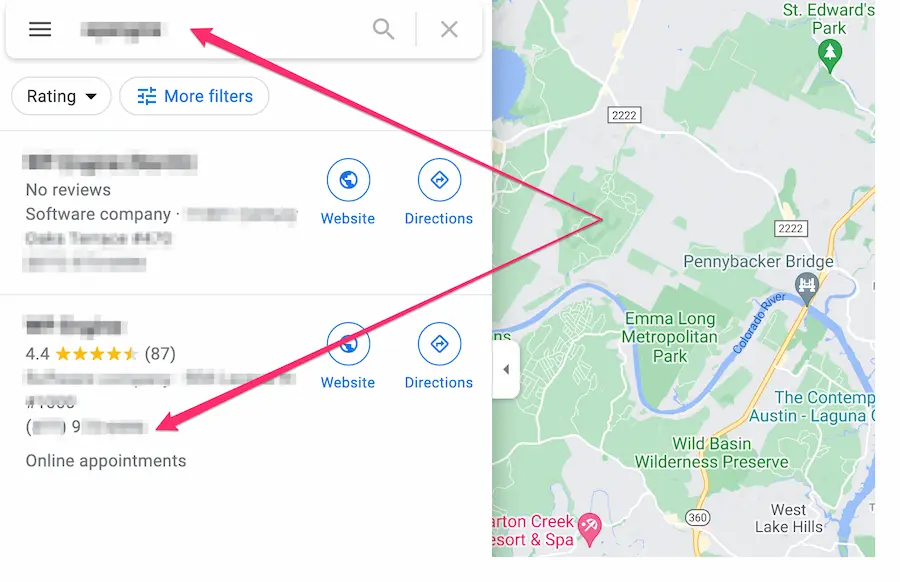
If a free white pages site shows a landline owner, check the date of the listing. Old records can show a family that moved years ago, and the number may now belong to someone else.
Free or paid: when a report is worth it
| Free methods | Paid phone reports | |
|---|---|---|
| Cost | Nothing, or your data with some apps | Usually a monthly subscription after a cheap trial |
| Business numbers | Almost always found | Found |
| Listed landlines | Often found | Found |
| Private mobile numbers | Sometimes, through apps and search engines | Often in the US, from merged records |
| Past addresses and relatives | Rarely | Often in the US |
| Numbers outside the US | Messaging apps work worldwide | Limited |
A paid report makes sense mainly for US numbers, when you need record-based details such as a full name, past addresses and other numbers the person used. Good services also let you opt out of their own database and don't need your contacts to work. Before you pay, read the renewal price, search once, save the report, and cancel the trial if you don't need more searches. Once you have a name, our guide to phone number owners shows how to confirm it.
Find lost contacts through old numbers
A reverse lookup isn't only for unknown callers. If you're trying to reconnect with a lost friend or relative, their old number is a good starting point. Search it in Google and the free people search sites: records often list the person's name next to old and new numbers, which can lead you to their current contact details.
Combine the old number with their name for the best results. A name plus a number from ten years ago narrows a search far more than either one alone, and it can lead you to a social media profile they created back then. If you have their name but no number at all, read how to find a phone number by name.
Numbers can also lead to online accounts. People sometimes register dating and social profiles with their number or with an email that a lookup report shows, and Dating Profile Search explains how to find dating profiles by email once you have one.
The order we'd use
Start with a quoted search in Google and Bing, in at least three formats. Then save the number and check WhatsApp, Telegram and Viber. For a US number, try Spy Dialer and a free people search site next. Run a carrier lookup if you suspect a scam. Use Truecaller only if those steps fail and you accept its data terms. Pay for a report only when you need details the free methods can't give.
That order costs nothing for the first four steps and keeps your own contacts private until the very end. Most numbers are identified before you get halfway through it.
Your own data is part of the price
Every lookup service needs data, and running servers and buying records costs money. So when a service charges nothing, ask what it gets instead. Often the answer is your contact list, your name and email, your location or your activity, which it can use for advertising or sell to data brokers.
Leaked personal data feeds identity theft, SIM swap fraud and more scam calls. So before you give a "free" lookup your contacts or your login, decide whether knowing the caller's first name is worth it. In many cases, a Google search and a WhatsApp check give you the same answer for free and keep your data where it belongs.
Questions about free phone lookups
Is there a completely free reverse phone lookup with the owner's name?
Not one that works for every number. For US numbers, ad-supported people search sites sometimes show a name for free, and for any country WhatsApp or Telegram may show the owner's name and photo. Search engines find the owner when the number was posted online. A site that promises the name of any mobile number for free usually ends with a payment page.
Why do free lookup sites show the city and carrier but not the name?
The city and carrier come from the number itself and cost the site almost nothing to look up. The owner's name comes from purchased or collected records, which cost money. So sites give away the cheap details to prove the search worked and charge for the name.
Is it safe to use Truecaller for a lookup?
It's legitimate, but read what you agree to. Truecaller builds its database partly from its users' contact lists, and the app asks for access to yours. If you'd rather not share your contacts, use its web search with an account you're comfortable linking, or use search engines and messaging apps instead.
How can I tell if a phone lookup site is a scam?
Watch for a long fake "scanning" animation, a countdown timer, a very cheap trial without a clear renewal price, and promises of live location or private messages. A legitimate service shows its price before the search and has a clear refund and opt-out policy. If the site asks you to install software, close it.