Snapchat username lookup: find who is behind an account
A Snapchat username is often all you have. Someone adds you, sends a strange message or asks for money, and the profile shows nothing but a nickname and a cartoon avatar. Snapchat makes this harder than any other big app: there's no public post history, no friends list for strangers to browse, and the app never shows anyone's phone number. Still, the username is a strong lead, because most people use the same handle, or something close to it, on sites that are far more open.
We tested the tools and methods in this guide over several weeks, on real usernames, before writing it. Only a few of them work well, and even the good ones can show old or wrong details if you don't check them. So this guide gives you both: every method that can lead from a Snapchat username to a real name, a photo, other accounts and contact details, and the checks that tell you whether a result is actually right. For the same method on every site, not only Snapchat, see our reverse username search guide.
In this guide
- How a Snapchat username lookup works
- What a Snapchat profile shows
- Method 1: check the username on other sites
- Method 2: search Google, Bing and DuckDuckGo
- Method 3: trace the profile photo and Stories
- Method 4: search the display name
- Method 5: ask mutual friends and group chats
- Method 6: paid username lookup tools
- Method 7: ask an investigator
- What each detail can lead to
- Phone numbers and Snapchat
- What Snap Map can and can't do
- Save the profile before it disappears
- Why it's worth checking
- What you can't find out
- Questions about Snapchat lookups
How a Snapchat username lookup works
A reverse username lookup starts from the handle and works outward. A search tool, or you by hand, checks where else that exact username exists, then collects what each of those places shows about its owner: a name, a photo, a city, an email or links to other accounts. The more places the person used the handle, the clearer the picture gets.
The weak point is the assumption behind it. A username is unique on each site, but not across sites. If you know that nancy_k on Snapchat belongs to a woman called Nancy, that doesn't mean the nancy_k on Reddit or TikTok is the same Nancy. Rare handles usually are the same person; common ones often aren't.
Some lookup tools make this worse. They treat john1 and john2 as one person, on the theory that someone found their first choice taken and added a number. Sometimes that's true, and often it isn't. That's why the good tools show you each profile separately and let you decide, and why every method below ends with a check.
What a Snapchat profile shows
Every Snapchat account has two names. The username is the unique handle, between 3 and 15 characters, and it can only be changed once a year. The display name is the name friends see in chats, and it can be anything: a real name, a nickname, an emoji. Always work from the username, because it's the part that stays the same, and use the display name as a second clue.
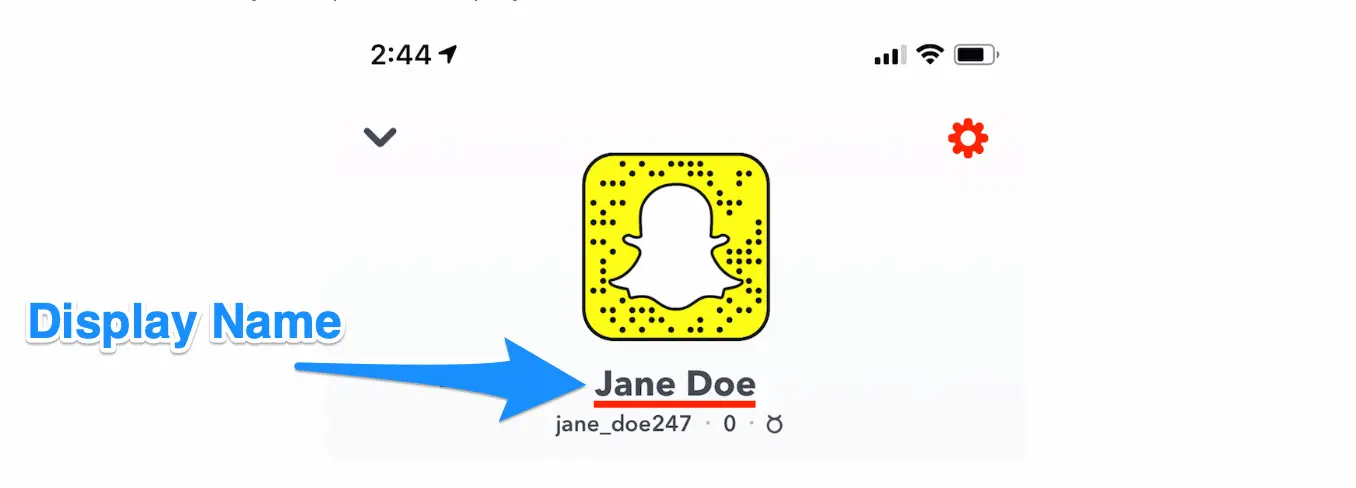
You can open any account's web page at snapchat.com/add/username without logging in. For most people, it shows the display name and their Bitmoji or Snapcode, and nothing else. Accounts with a public profile show more: a bio, a profile photo, public Stories, Spotlight videos and a subscriber count. Creators and businesses use public profiles, and so do some regular users who want to be found.
Inside the app, adding someone shows you a little extra. Friends can see each other's Stories, their birthday if it's switched on and their location on Snap Map if they share it. Strangers see none of that. So adding an account you don't know rarely tells you who it is, and it tells the owner that you're looking.
Method 1: check the username on other sites
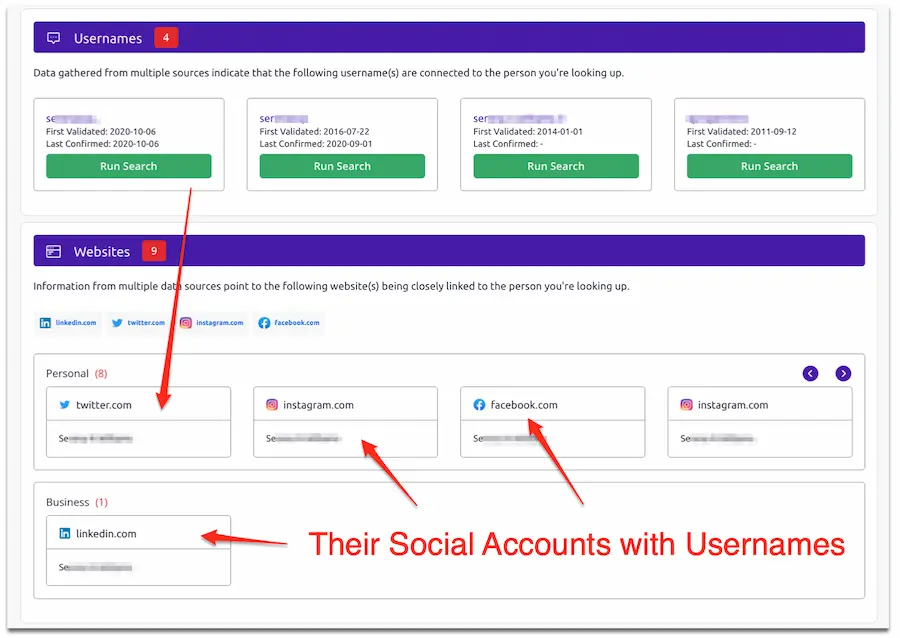
The fastest route to the person is another site where they use the same handle. Run the username through the free Trustiko username search, which checks hundreds of sites at once and lists only the accounts that exist. The free Reverse Username Search tool does a similar check across social and dating sites. Profiles on Reddit, GitHub, gaming sites and forums often show a first name, a city or a photo that Snapchat hides.
You can run the same check by hand. Suppose the Snapchat user is linda-mc-1990. Put the handle into each site's profile address and open it in your browser:
| Site | Profile address | Notes |
|---|---|---|
instagram.com/username | The most common match for Snapchat users. | |
| TikTok | tiktok.com/@username | Bios often say "sc: handle". |
| X | x.com/username | Usually asks you to log in before showing posts. |
facebook.com/username | Only works if the person set a custom profile address. | |
linkedin.com/in/full-name | Uses a name rather than a handle, so try it once you have a name. |
Don't stop at the exact spelling. Snapchat allows hyphens in usernames, while Instagram, TikTok and X don't. So the same person usually becomes linda_mc_1990, linda.mc.1990 or lindamc1990 elsewhere.
sara-m21Hyphens allowedsara_m21sara.m21saram21No hyphenssara_m21sara.m21saram21No hyphenssara_m21saram21No hyphens or periodsWhen a page says "not found" or "this profile isn't available", it means one of two things. Either no account uses that handle, or the account exists but its privacy settings hide it from visitors. Instagram and TikTok still show a private profile's photo and name field, so a private match is still useful. Facebook often hides private profiles completely.
Method 2: search Google, Bing and DuckDuckGo
Search engines index public Snapchat pages and, more usefully, the places where people post their handle. Copy the username exactly from the profile and search it in Google inside quotation marks, like "robert2024". The quotes force an exact match, so Google drops pages that only contain similar words.
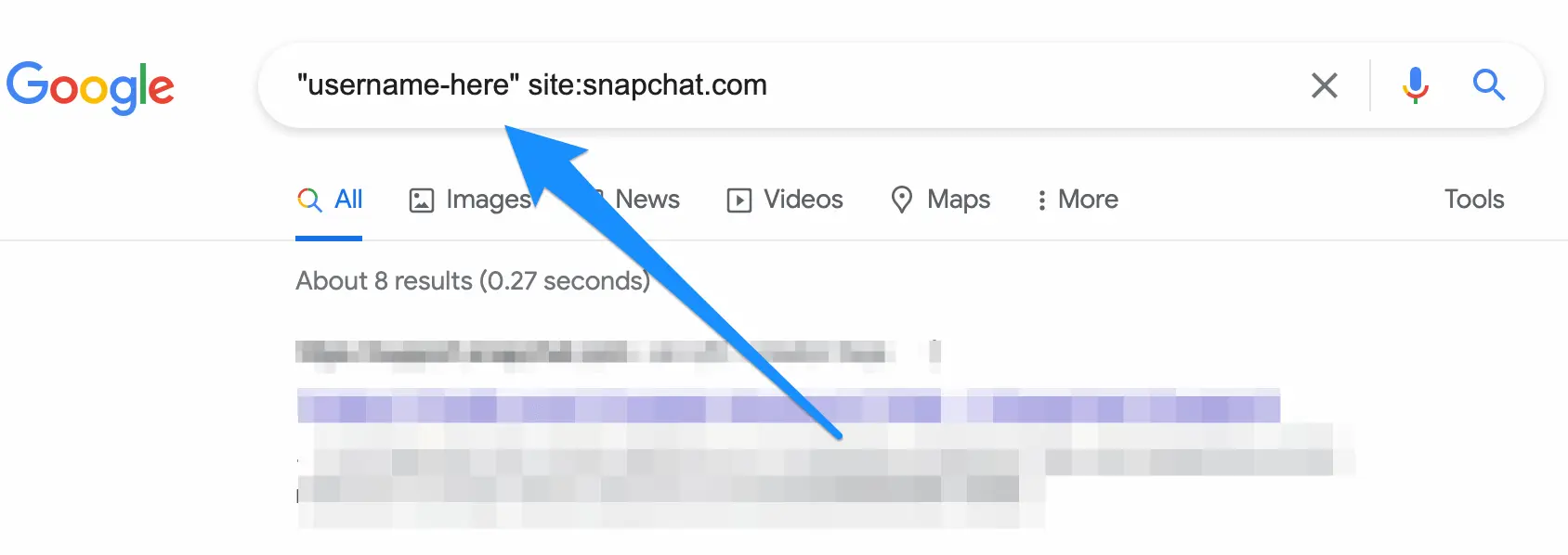
site:snapchat.com finds the account's public page if Google has indexed it.Then add words that pull the results toward a name. "robert2024" snapchat finds pages where people share their Snapchat, such as Instagram bios, Reddit threads and dating profiles ("add me on snap: robert2024"). "robert2024" name or "robert2024" Denver narrows things further if you know a city. Open every result and read it carefully, because different people can share a handle on different sites.
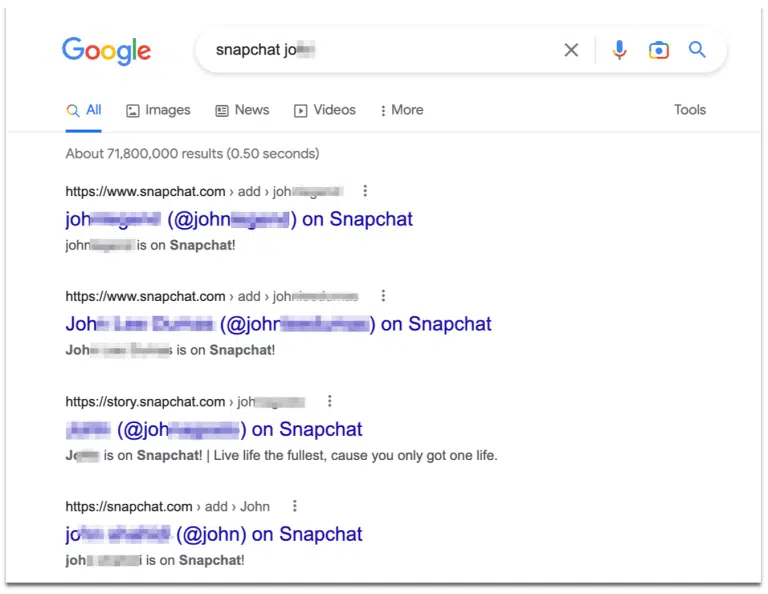
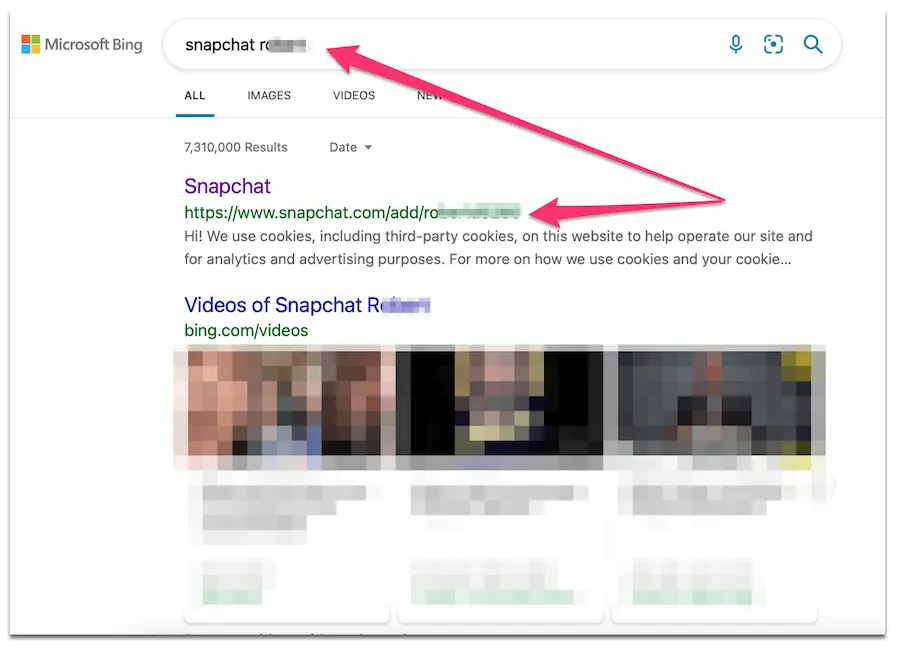
snapchat.com/add/ pages with the display name next to each username.Run the same searches in Bing. Search engines don't find and rank pages the same way, and Bing often shows Snapchat profile pages and videos that Google skips. In the screenshot below, Bing lists the profile's snapchat.com/add/ page at the top, with public videos from the account under it.
Finish with DuckDuckGo. It gets most of its results from Bing but mixes in other sources, and it sometimes surfaces a forum post or a small site the other two missed. Three engines take five minutes and cover far more of the web than one.
Method 3: trace the profile photo and Stories
A real photo is often the best clue a Snapchat account gives you. People spend time choosing a good picture and then reuse it everywhere, so the same selfie usually turns up on Instagram, Facebook or a dating profile under a real name. This only works when the account uses a real photo, not just a Bitmoji.
Take a screenshot of the profile photo, or of a public Story or Spotlight frame that shows the person's face. Crop it tightly to the face so the app's buttons and the Bitmoji don't confuse the search, and sharpen it slightly if it's blurry. Then run it through Google Lens, TinEye, Bing Visual Search and Yandex Images, because each one indexes different sites. Paid face search tools such as Social Catfish search dating sites that the free engines don't reach.
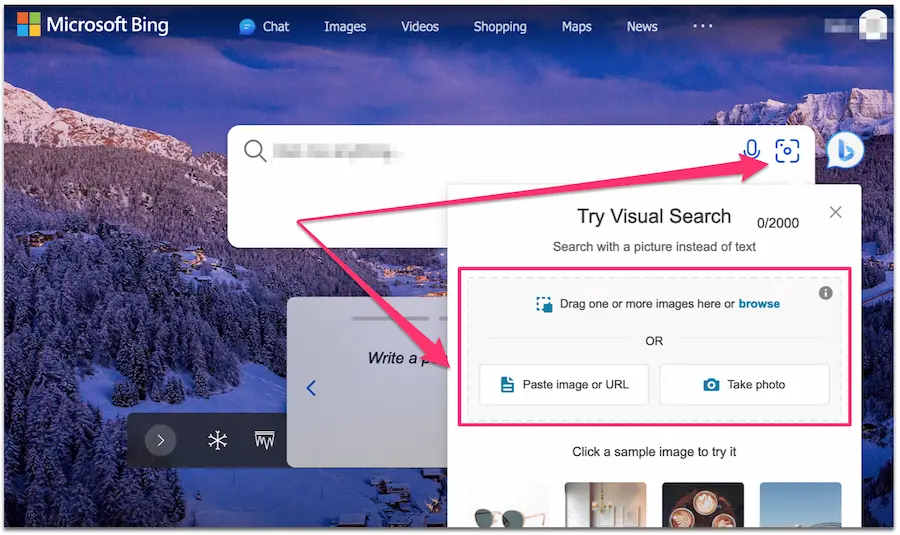
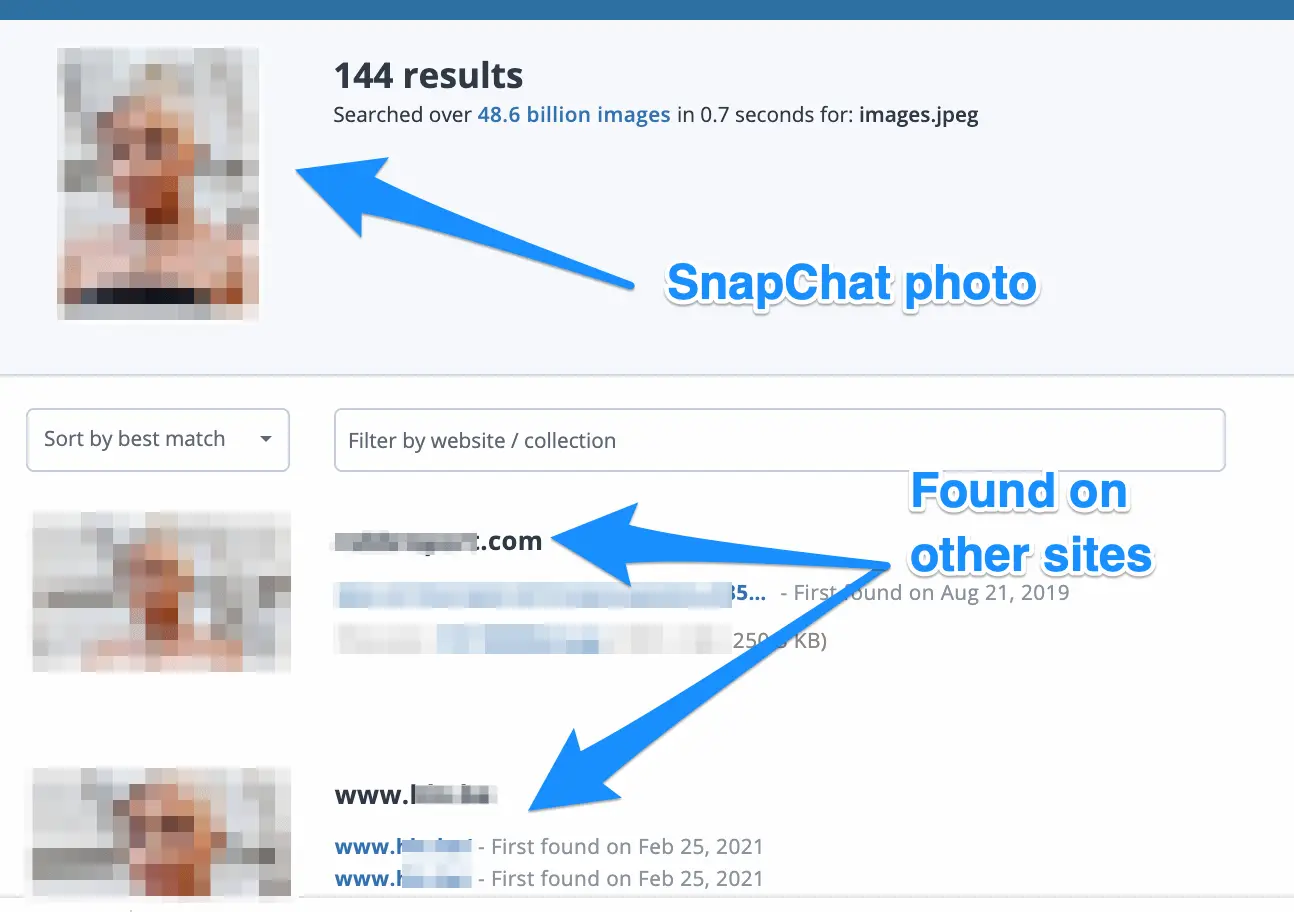
If the face search finds nothing, describe the photo instead. People reuse the same mirror selfies, so a search like "red phone case" mirror selfie site:instagram.com OR site:tiktok.com sometimes finds the same shot. Low-resolution pictures rarely match in any engine, so always use the clearest version you can get.
Stories and Spotlight videos are worth reading even when the face doesn't match anything. A school logo, a team shirt, a street sign, a shop or a view from a window can tell you the city or the workplace. Location tags and hashtags help too: a user who keeps tagging the same town or gym has told you where to look. If you can't see someone's Stories, they share them only with friends.
Be careful with what a photo match means. If the same picture appears under several different names, you're probably looking at a fake account using someone else's photos, not the photo's real owner. That's common with accounts that pretend to be models, soldiers or celebrities.
Method 4: search the display name
The display name is the second piece of information every profile has, and many people use their real name there even when the handle is a nickname. Search it in Google with quotes and add anything else you know: the city, the school, the job. "Megan Torres" Phoenix is far more useful than the name alone.
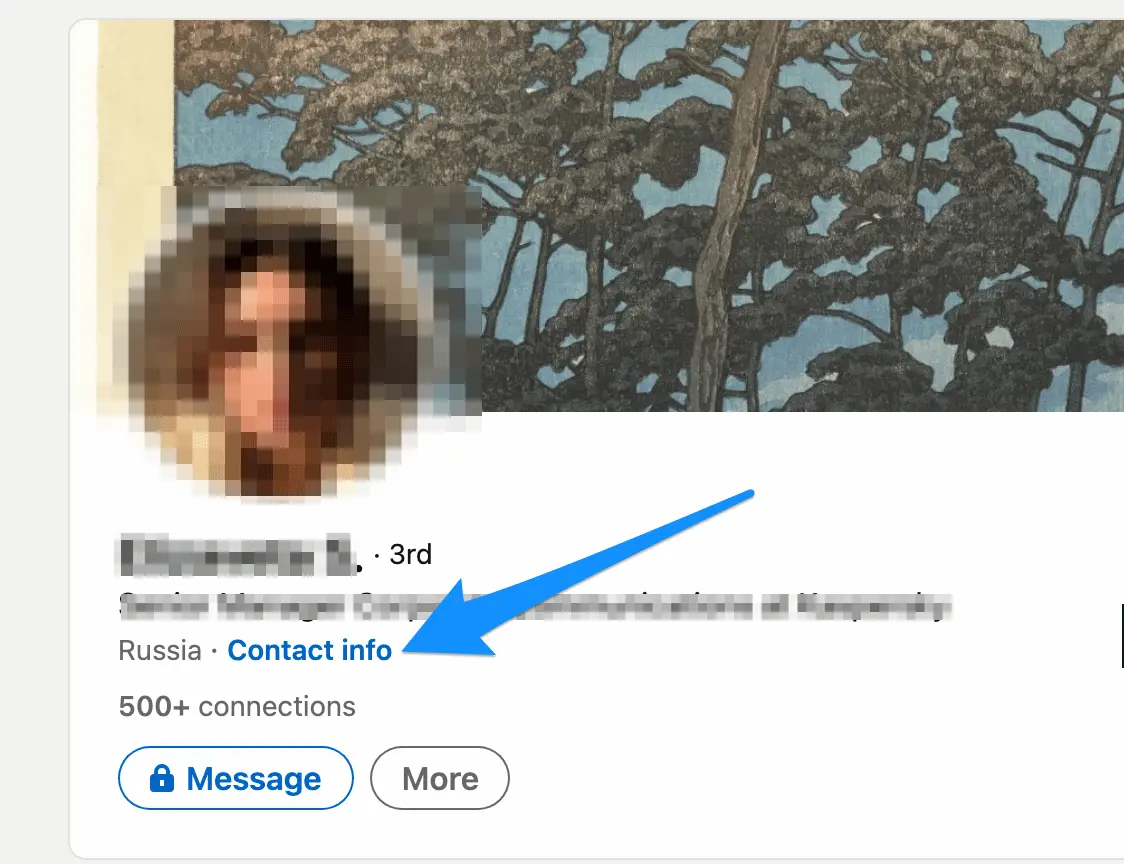
Background search sites also accept a name and a city and return possible matches with ages, past addresses and relatives. They work best for US adults. Compare the ages and towns in the results with what the Snapchat account shows, and only trust a match when several details line up.
Watch out for "free background search" sites that show a random list of names from around the world, or that ask you to log in with your Snapchat account. Never link your Snapchat to a third-party lookup site. Those sites can take your own username, number and contacts and sell them to data brokers. Use only services that state their prices and data sources clearly.
Method 5: ask mutual friends and group chats
The quickest answer sometimes comes from people, not tools. If the account appears in your Quick Add suggestions, you probably share friends or contacts, which narrows it down to your school, workplace or town. Look at who those mutual friends are.
If the user is in a Snapchat group chat with you, tap their name in the group to see their profile, then read back through the chat. Someone may have used their real name, tagged them or mentioned where they work. When you still can't tell, ask a friend in the group who seems to know them. That's often how people find out that a "new" account is someone they already know.
Skip the old advice about browsing nearby users or the Snapchat directory. There's no way to filter those lists by name or username, so they won't help you identify one specific person.
Method 6: paid username lookup tools
Paid people search tools accept a username and return a report built from public profiles, data breaches and public records. In our tests, Social Catfish and Spokeo gave the most useful Snapchat reports. Spokeo is based in the US and works best for US users, while Social Catfish adds image search and covers more dating sites.
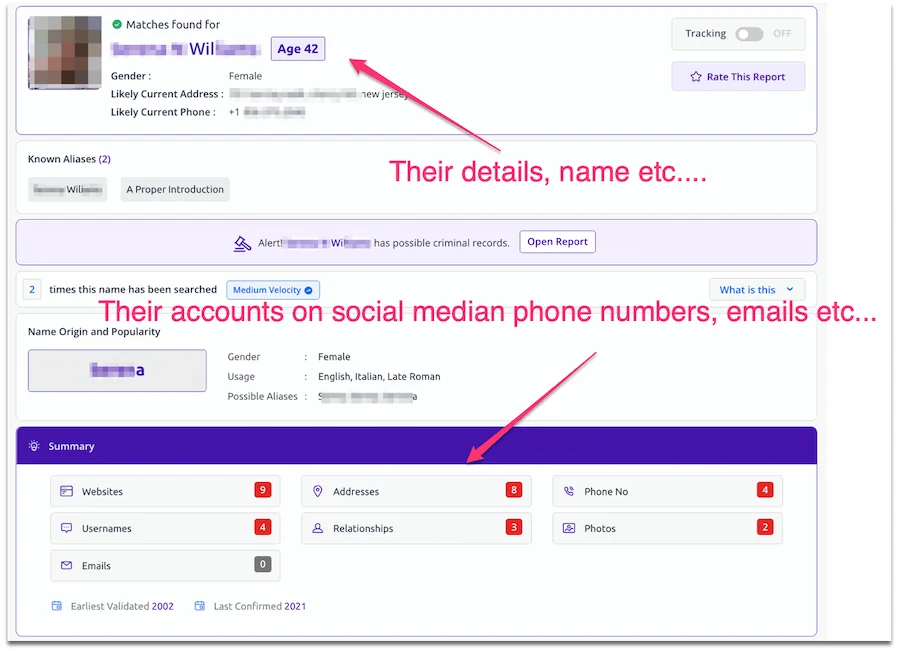
A good report can include some or all of these, depending on how much of the person's data exists in the tool's sources:
- The full name, sometimes with a middle name and known aliases.
- Email addresses and phone numbers linked to the username.
- Other social media and dating accounts under the same or similar handles.
- Current and past cities or addresses.
- Photos found on those accounts.
- Possible relatives and associates.
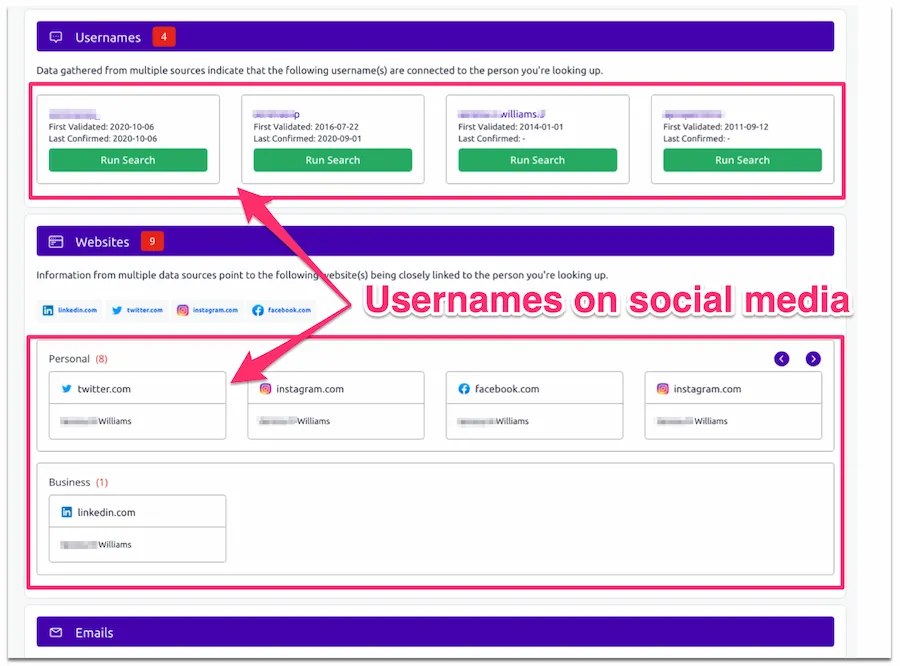
Reports are only as good as their sources, so check two things before you trust one. First, is the username still active on Snapchat? Old handles get released and claimed by new people, so a report built from records about the previous owner points at the wrong person. Second, do the photos in the report match the Snapchat account? If they don't, treat the rest of the report as unconfirmed.
Many tools limit how many searches you can run on a trial, so save a good report as a PDF before you close it. And for a teenager's account, or a handle used only on Snapchat, expect these tools to return little or nothing.
Method 7: ask an investigator
When the stakes are high, for example a scam that cost you money or someone threatening you, a licensed private investigator or a digital forensics specialist can go further than public tools. They know where to look, they keep evidence in a form that police and courts accept, and they know the legal limits.
Impersonation scams are a common reason to call one. Scammers copy a celebrity's or influencer's photos, pick a handle one character away from the real one and ask fans for money or "verification fees". An investigator can document the account properly before it disappears. For threats or extortion, though, go to the police first: only they can make Snap hand over account details.
What each detail can lead to
Every new detail opens another search, which is why one username can turn into a full picture of a person. Here's what to do with each kind of detail once you find it.
A real name
Verify it before you rely on it. Search the name with the city, check that a profile under that name uses the same photos, and look for a second, independent source. Display names get abbreviated and changed, and many people share the same name, so one source alone is only a guess.
An email address
An email often leads to more accounts than the username does, because people sign up for everything with it. Our email lookup guide shows how to find the profiles linked to an address, and Dating Profile Search explains how to find dating profiles registered with it. Don't assume every username leads to an email, though; many people keep theirs completely private.
A phone number
A number found through a username can confirm the name and lead to WhatsApp, Telegram and dating profiles. Dating Profile Search, for example, explains how to look for a Tinder profile from a number. Check that the number is current first, since old numbers get reassigned to new people.
Other social media accounts
Read each matched account carefully: the bio, the oldest posts, the comments and who the person interacts with. Old posts often show details the person later hid. Some fake accounts reveal themselves here, because their "other" accounts are all new and empty.
A city or address
Treat any home address from a lookup with suspicion. Records lag behind real moves by months or years, and some tools guess an address from relatives. Compare it with what the person's own posts show about where they live, and never turn up at an address you found online.
Friends, relatives and associates
If the person's other accounts are public, their friends and followers can confirm who they are. A cousin tagging them, a sports team listing them or a school page mentioning them is strong evidence. Click through a few of those profiles and see whether they link back to the account you started with.
Phone numbers and Snapchat
Snapchat has never shown phone numbers to other users, and it doesn't let anyone look up a number from a username. So there's no in-app way to get someone's number from their Snapchat. The number can still turn up elsewhere: in a public profile bio, on a linked business page or in the records that paid people search tools hold. Our guide explains how to get a number from Snapchat through the details people share.
The opposite direction works better. If you already have someone's number, save it in your contacts and use Snapchat's Add Friends contact sync. If the person left "Let others find me using my mobile number" switched on, their account appears. Our guide to finding someone on Snapchat by number covers it step by step. The same idea works on WhatsApp and Viber, where a saved number often shows a name and photo.
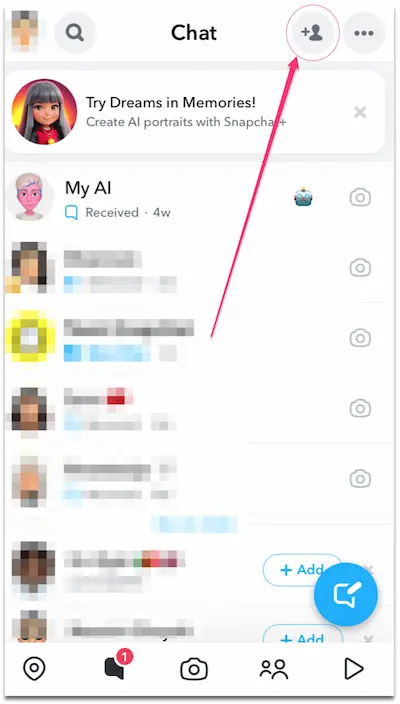 1. Tap Add Friends
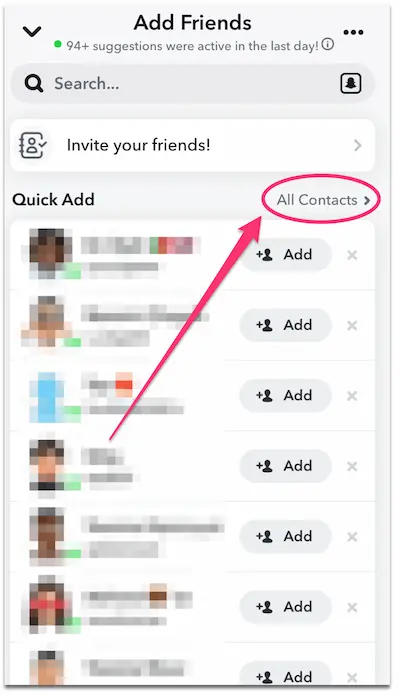 2. Open All Contacts
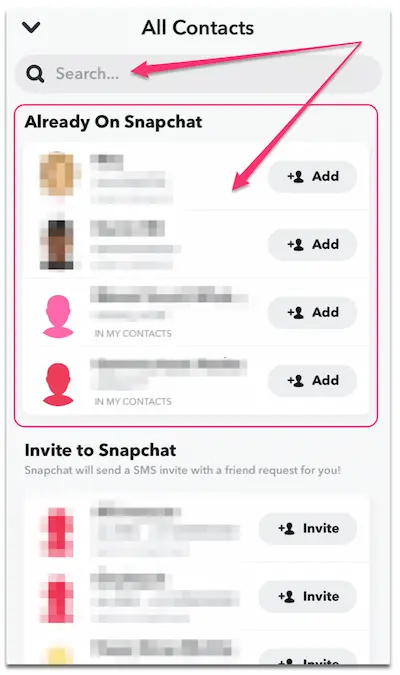 3. Check "Already on Snapchat"
What Snap Map can and can't do
Snap Map shows your friends' locations if they choose to share them, and public Snaps posted from places around the world. It can't search for a person by username or name, and it doesn't show strangers' locations. People who switch on Ghost Mode disappear from the map even for their friends.
So Snap Map won't identify an anonymous account. It can only help once you're already friends with someone who shares their location, and even then, using it to follow someone who doesn't know you're watching is a line you shouldn't cross.
Save the profile before it disappears
Fake and scam accounts don't last. When the people behind them feel someone is checking, they change the username, which Snapchat allows once a year, or delete the account entirely. If that happens before you've saved anything, you lose the clues you had.
So take screenshots first: the profile page, the display name, the Bitmoji or photo, any public Stories and the chat with you. Note the exact username and the date. Those screenshots let you keep searching after the account vanishes, and they're what Snapchat support or the police will ask for if you report it.
Why it's worth checking
Snapchat is built for talking to people you already know, but plenty of users chat with strangers they met through Quick Add, dating apps or other social networks. That's exactly where romance scams, sextortion attempts and fake sellers start, because the app makes it easy to hide who you are.
A few minutes of checking can tell you whether the person in your chat is who they say they are. Do it before you send money, share photos, meet in person or buy something from a stranger. A real person usually has a trail: other accounts, old posts, friends who tag them. An account with no trail at all is a warning sign in itself.
What you can't find out
No legal method shows you another person's Snaps, chats, friends list or the email and phone number on their account. Sites that claim to "hack" or "view private Snapchat" are scams that collect your details or your money. Snapchat releases account data only to the account owner or to police with a legal order.
If an account is harassing or threatening you, report it in the app (press and hold their name and look for Report) and block it. For threats, blackmail or anything involving a minor, contact the police, who can request the account details from Snap. And whatever you find about someone you met online, use it to stay safe, not to follow or contact them against their wishes.
Questions about Snapchat lookups
Can you find someone's Snapchat if you only know their name?
Sometimes. Search the name in Snapchat's Add Friends screen, since many people use their real name as the display name. If that fails, find their Instagram or TikTok first, because people often list their Snapchat handle in the bio there. A name alone works best when it's uncommon or when you also know their town or school.
Does Snapchat tell someone when you look at their profile?
No. Snapchat doesn't notify anyone when you open their profile or their snapchat.com/add/ page. Snapchat does notify people when you add them, take a screenshot of their Snap or chat, or view their Story, since your name appears in the viewer list. A lookup on other sites never involves Snapchat at all.
Why does a Snapchat username show no results anywhere else?
The person may use the handle only on Snapchat, or they may have changed it, which Snapchat allows once a year. Try the variations other platforms allow, such as an underscore instead of a hyphen. If nothing turns up, the account may be new or made for one purpose, which is worth keeping in mind if a stranger is pushing you to trust them.
Can Snapchat tell me who owns an account that is harassing me?
Snapchat won't tell you, but it will act on reports. Report the account in the app and block it. If the messages include threats, blackmail or sexual content involving a minor, go to the police, who can request the account details from Snap with a legal order.